









































New to KubeDB? Please start here.
Oracle QuickStart
This tutorial will show you how to use KubeDB to run an Oracle database.
Note: The YAML files used in this tutorial are stored in [docs/examples/oracle/quickstart](https://github.com/kubedb/docs/tree/{{ < param “info.version” >}}/docs/examples/oracle/quickstart) folder in the GitHub repository kubedb/docs .
Before You Begin
You need a Kubernetes cluster and kubectl configured to communicate with it. If you do not have a cluster, you can create one using kind
install the KubeDB CLI on your workstation and the KubeDB operator in your cluster following the instructions here
check available StorageClass in your cluster:
$ kubectl get storageclasses
NAME                 PROVISIONER             RECLAIMPOLICY   VOLUMEBINDINGMODE      ALLOWVOLUMEEXPANSION   AGE
standard (default)   rancher.io/local-path   Delete          WaitForFirstConsumer   false                  28d
Use a separate namespace for isolation:
$ kubectl create ns demo
namespace/demo created
Find Available Oracle Versions
KubeDB maintains an OracleVersion CRD with all supported Oracle versions:
$ kubectl get oracleversions
NAME     VERSION   DISTRIBUTION   DB_IMAGE                          DEPRECATED   AGE
21.3.0   21.3.0                   ghcr.io/kubedb/oracle-ee:21.3.0                28d
Create an Oracle Database
KubeDB implements an Oracle CRD to define Oracle database specifications. Below is an example:
apiVersion: kubedb.com/v1alpha2
kind: Oracle
metadata:
  name: oracle
  namespace: demo
spec:
  deletionPolicy: Delete
  edition: enterprise
  mode: Standalone
  podTemplate:
    spec:
      containers:
        - name: oracle
          resources:
            limits:
              cpu: "4"
              memory: 10Gi
            requests:
              cpu: "2"
              memory: 3Gi
      initContainers:
        - name: oracle-init
          resources:
            limits:
              memory: 512Mi
            requests:
              cpu: 200m
              memory: 256Mi
      securityContext:
        fsGroup: 54321
        runAsGroup: 54321
        runAsUser: 54321
  replicas: 1
  storage:
    accessModes:
      - ReadWriteOnce
    resources:
      requests:
        storage: 30Gi
  storageType: Durable
  version: 21.3.0
$ kubectl create -f https://github.com/kubedb/docs/raw/v2025.10.17/docs/examples/oracle/quickstart/standalone.yaml
oracle.kubedb.com/oracle created
Here,
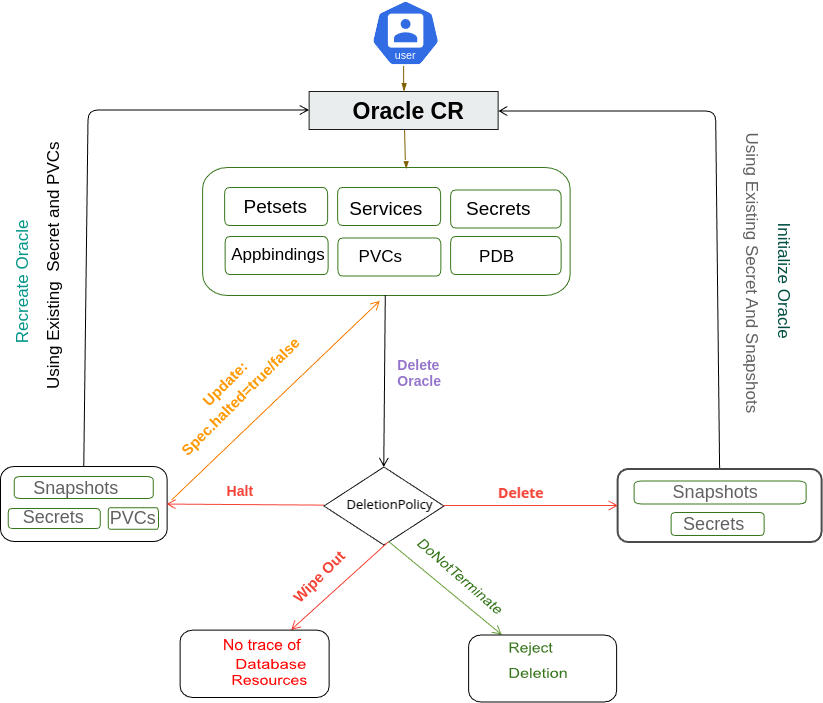
spec.version: Refers to theOracleVersion CRDspecifying the docker image.spec.edition: Database edition (enterprisein this example).spec.mode: Deployment mode (StandaloneorDataGuard).spec.storageType: Can beDurable(uses PVC) orEphemeral(uses EmptyDir).spec.storage: Defines PVC size and access mode.spec.podTemplate: Customize resource requests/limits, init containers, and security context.spec.replicas: Number of database pods (1 for standalone, ≥2 for DataGuard).spec.deletionPolicy: Controls behavior when deleting the Oracle CRD (Delete,Halt,WipeOut). For more details, see here.
KubeDB operator watches for Oracle objects using Kubernetes api. When a Oracle object is created,
KubeDB operator will create a new PetSet and a Service with the matching Oracle object name. KubeDB
operator will also create a governing service for PetSets with the name kubedb, if one is not already
present.
If we describe the Oracle CRD we will get an overview of the steps that were followed.
$ kubectl  describe oracle -n demo oracle

Name:         oracle
Namespace:    demo
Labels:       <none>
Annotations:  <none>
API Version:  kubedb.com/v1alpha2
Kind:         Oracle
Metadata:
  Creation Timestamp:  2025-09-17T09:19:12Z
  Finalizers:
    kubedb.com/oracle
  Generation:        2
  Resource Version:  54974
  UID:               46afbf62-caab-4649-a475-64025c319eba
Spec:
  Auth Secret:
    Name:  oracle-auth
  Auto Ops:
  Deletion Policy:  Delete
  Edition:          enterprise
  Health Checker:
    Failure Threshold:  1
    Period Seconds:     10
    Timeout Seconds:    10
  Listener:
    Port:      1521
    Protocol:  TCP
    Service:   ORCL
  Mode:        Standalone
  Pod Template:
    Controller:
    Metadata:
    Spec:
      Containers:
        Name:  oracle
        Resources:
          Limits:
            Cpu:     4
            Memory:  10Gi
          Requests:
            Cpu:     2
            Memory:  3Gi
        Security Context:
        Name:  oracle-coordinator
        Resources:
          Limits:
            Memory:  256Mi
          Requests:
            Cpu:     200m
            Memory:  256Mi
        Security Context:
      Init Containers:
        Name:  oracle-init
        Resources:
          Limits:
            Memory:  512Mi
          Requests:
            Cpu:     200m
            Memory:  256Mi
        Security Context:
      Pod Placement Policy:
        Name:  default
      Security Context:
        Fs Group:            54321
        Run As Group:        54321
        Run As User:         54321
      Service Account Name:  oracle
  Replicas:                  1
  Storage:
    Access Modes:
      ReadWriteOnce
    Resources:
      Requests:
        Storage:  30Gi
  Storage Type:   Durable
  Version:        21.3.0
Status:
  Conditions:
    Last Transition Time:  2025-09-17T09:19:12Z
    Message:               The KubeDB operator has started the provisioning of Oracle: demo/oracle
    Observed Generation:   1
    Reason:                DatabaseProvisioningStartedSuccessfully
    Status:                True
    Type:                  ProvisioningStarted
    Last Transition Time:  2025-09-17T09:19:26Z
    Message:               All replicas are ready
    Observed Generation:   2
    Reason:                AllReplicasReady
    Status:                True
    Type:                  ReplicaReady
    Last Transition Time:  2025-09-17T09:27:58Z
    Message:               The Oracle: demo/oracle is accepting connection
    Observed Generation:   2
    Reason:                AcceptingConnection
    Status:                True
    Type:                  AcceptingConnection
    Last Transition Time:  2025-09-17T09:27:58Z
    Message:               DB is ready because of server getting Online and Running state
    Observed Generation:   2
    Reason:                AllReplicasReady
    Status:                True
    Type:                  Ready
    Last Transition Time:  2025-09-17T09:21:11Z
    Message:               The Oracle: demo/oracle is successfully provisioned.
    Observed Generation:   2
    Reason:                DatabaseSuccessfullyProvisioned
    Status:                True
    Type:                  Provisioned
  Phase:                   Ready
Events:                    <none>
🔹Status: (What the operator reports now)
Conditions:
    - ProvisioningStarted → operator started creating the DB.
    - ReplicaReady → all pods are running.
    - AcceptingConnection → DB listener is online at port 1521.
    - Ready → fully ready for queries.
    - Provisioned → provisioning completed successfully.
Phase:
    - Ready → Database is online, healthy, and serving connections.
Check Resources Created by KubeDB operator:
$ kubectl get oracle,pods,pvc,services -n demo
NAME                       VERSION   MODE         STATUS   AGE
oracle.kubedb.com/oracle   21.3.0    Standalone   Ready    109m

NAME           READY   STATUS    RESTARTS   AGE
pod/oracle-0   1/1     Running   0          109m

NAME                                  STATUS   VOLUME                                     CAPACITY   ACCESS MODES   STORAGECLASS   VOLUMEATTRIBUTESCLASS   AGE
persistentvolumeclaim/data-oracle-0   Bound    pvc-66385705-e0f3-4658-abcb-78dbacbfc3d7   30Gi       RWO            local-path     <unset>                 109m

NAME                  TYPE        CLUSTER-IP     EXTERNAL-IP   PORT(S)    AGE
service/oracle        ClusterIP   10.43.170.95   <none>        1521/TCP   109m
service/oracle-pods   ClusterIP   None           <none>        1521/TCP   109m
Connect to Oracle Database
$ kubectl exec -it -n demo oracle-0 -- bash
Defaulted container "oracle" out of: oracle, oracle-init (init)
bash-4.2$ sqlplus / as sysdba

SQL*Plus: Release 21.0.0.0.0 - Production on Wed Sep 24 05:11:41 2025
Version 21.3.0.0.0

Copyright (c) 1982, 2021, Oracle.  All rights reserved.

Connected to:
Oracle Database 21c Enterprise Edition Release 21.0.0.0.0 - Production
Version 21.3.0.0.0

SQL> exit
Disconnected from Oracle Database 21c Enterprise Edition Release 21.0.0.0.0 - Production
Version 21.3.0.0.0
Cleaning up
To clean up the Kubernetes resources created by this tutorial, run:
$ kubectl patch -n demo oracle/oracle -p '{"spec":{"deletionPolicy":"WipeOut"}}' --type="merge"
$ kubectl delete oracle -n demo oracle
$ kubectl delete ns demo